How to delete an entry from AutoCorrect?

To display the AutoCorrect dialog box, press Alt + T + A or click AutoCorrect from the Quick Access Toolbar. Word displays the AutoCorrect dialog box.

NoteIf AutoCorrect is not available in your Quick Access Toolbar, read the following article to add AutoCorrect to your Quick Access Toolbar.

https://wordknowhow.wordpress.com/2013/05/14/how-to-customize-the-quick-access-toolbar-in-word-2007/?preview=true&preview_id=319&preview_nonce=f77d720900&post_format=standard

https://wordknowhow.wordpress.com/2013/06/06/how-to-use-autocorrect-feature-in-word/?preview=true&preview_id=442&preview_nonce=786767bcc8&post_format=standard

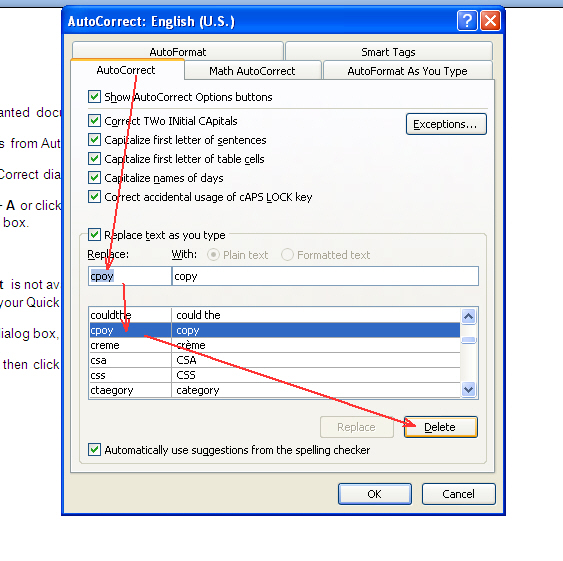
On the AutoCorrect dialog box, in the Replace field, type the entry that you want to delete.
Untitled

Select the entry and then click the Delete button. You are done.

wordknowhow's avatar
About wordknowhowhttp://wordknowhow.comGreetings everyone! I'm Anupam Baruah from India. I started this blog site to help people with Microsoft Word. I use Word a lot at work, and I understand that some features are difficult to use. There were no simplified step-by-step instructions online to help me use these features. That's why I created this blog – to help you navigate Word with ease. Please feel free to ask any questions or share your Word woes. I will do my best to help you!

If the post really helped you, please leave a comment

This site uses Akismet to reduce spam. Learn how your comment data is processed.